
VTEX store without www: how to set up a redirect
Your VTEX store opens with www but fails without it? Learn why and set up an HTTPS redirect while keeping your working store address.
The store works. The address your customer typed does not.
You finish setting up your store, open its full address and everything looks ready. Days later, someone tells you the website won't open. It still works on your computer. The difference is four characters: you opened www.yourstore.com; they typed yourstore.com.
On the customer's side, the problem shows up as one of these browser screens:
| Browser screen | Code | What happened |
|---|---|---|
| This site can't be reached | DNS_PROBE_FINISHED_NXDOMAIN | The domain without www has no DNS record: it doesn't point anywhere. |
| yourstore.com unexpectedly closed the connection | ERR_CONNECTION_CLOSED | The domain points to a server that doesn't serve that name, such as an old IP or another platform's. |
| Your connection is not private | NET::ERR_CERT_COMMON_NAME_INVALID | A server answers, but without a valid certificate for that address. The store looks unsafe. |
To a shopper, none of them looks like a technical error. It looks like a store that's down, or one they can't trust.
And that short address is exactly the one that travels most. It's in your Instagram bio, printed on packaging and business cards, said out loud in a story or a radio ad. If you pay for clicks on a campaign and the link uses the domain without www, every click that lands on an error page is money spent with no chance of a sale.
This guide solves one specific case: a VTEX store already working on www that also needs to accept visits to the domain without www. If www itself doesn't open, start with the main-domain setup in VTEX; a redirect can't fix an unavailable destination store.
Why VTEX doesn't serve the domain without www
The root domain is the name without a prefix, such as yourstore.com. The www version is a subdomain: a separate address within that domain. To a shopper they're the same store. To the internet they're two names, and each one needs its own setup.
DNS is the list that says where each name is served. On VTEX, www points to the platform with a CNAME record, which means "this name is an alias of another": www.yourstore.com is an alias of www.yourstore.com.cdn.vtex.com, the VTEX address that serves the store. The catch is that standard DNS rules don't allow a CNAME on the root of a domain. The root uses an A record, which points to an IP, and VTEX doesn't provide a fixed IP for your store. So the root is left with no destination, or stuck on an old hosting IP, and anyone who types it without www sees one of the screens above.
VTEX guidance for access without www is to keep the store on www and redirect the version without it. The root domain becomes an entrance that takes shoppers to the store. You don't need a second storefront.
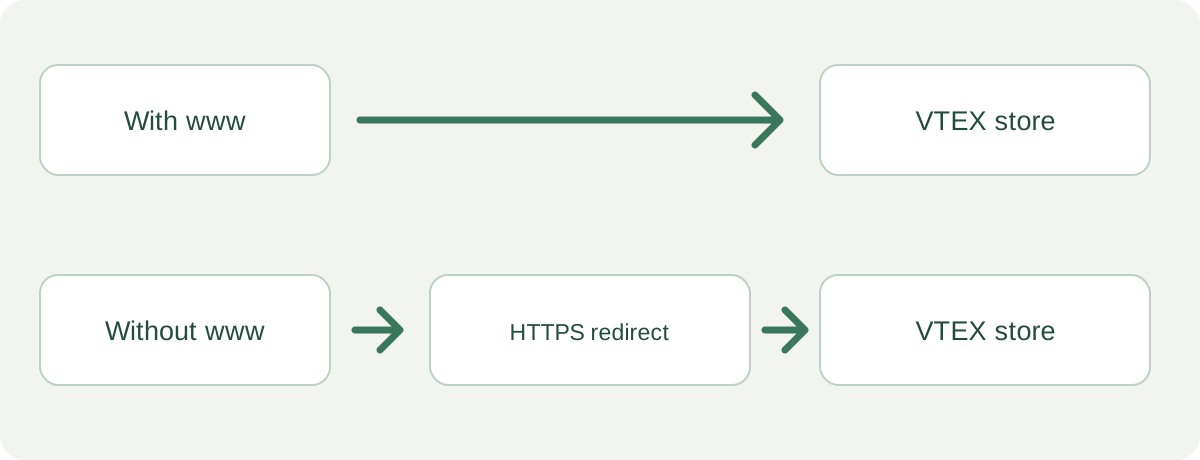
An HTTP redirect is a different thing: it's a server's answer telling the browser "open this other URL". So the root has to point, through DNS, to some server that gives that answer. That server is what you choose in "Choose based on the work you want to maintain" below.
Why testing only the store name is not enough
The address without www must also respond over HTTPS. Before accepting a redirect over a secure connection, the browser checks the certificate of the address the visitor opened. A certificate for www.yourstore.com isn't valid for yourstore.com.
That's why a setup can work with http:// and fail with https://. And today almost everyone arrives over https://: Chrome tries HTTPS first even when someone types just the name. A secure destination isn't enough; the entrance needs to be secure too. See also HTTPS on the domain without www.
Choose based on the work you want to maintain
Any option below works if it meets three requirements: it answers on http:// and https:// with a valid certificate for yourstore.com, returns a 301 to www, and keeps the URL path (someone opening yourstore.com/product should reach the product, not the home page).
There's also CNAME Flattening, a feature of some DNS providers that works around the root CNAME rule. It isn't a redirect: it makes the root serve the store directly, and VTEX has its own requirements for it. If your team chose that route, follow VTEX's documentation instead of mixing the two solutions.
How to set it up without touching the working www
The steps below use Redirect-301. Before changing anything, take a screenshot of your current DNS records. In the setup described in DNS on VTEX, www has a CNAME to www.yourstore.com.cdn.vtex.com. That record doesn't change: we only touch the root.
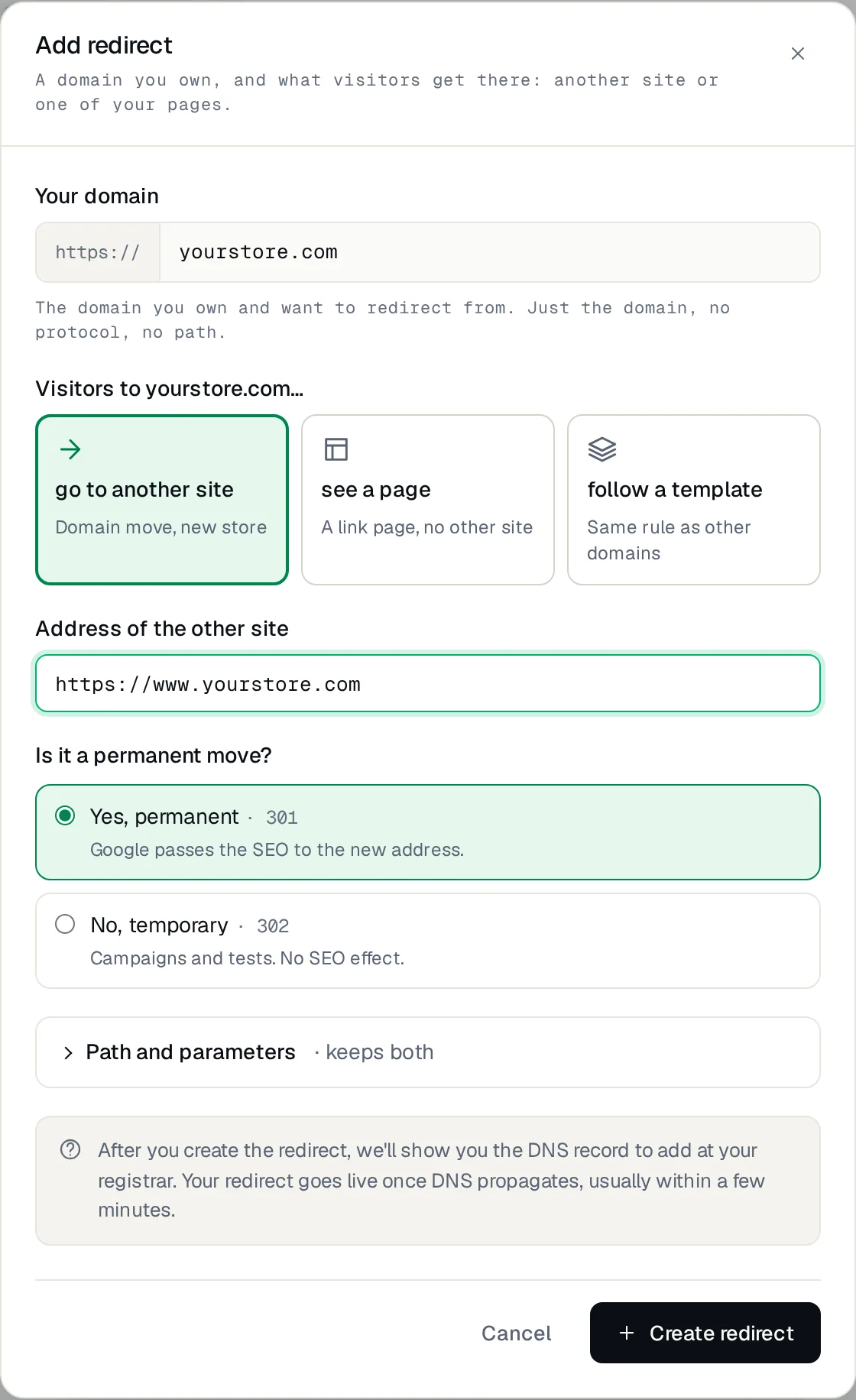
- In the Redirect-301 dashboard, add the source domain yourstore.com, without https:// and without a trailing slash.
- Choose go to another site and enter https://www.yourstore.com as the destination. Under Is it a permanent move?, choose Yes (301): www is the store's permanent address.
- Under Path and parameters, keep both options on. That way yourstore.com/running-shoes/p goes to www.yourstore.com/running-shoes/p, and campaign parameters (utm_source and others) arrive intact.
- At your DNS provider, create or edit the root A record with the value shown in the dashboard. The root shows as @ or as an empty name field, depending on the provider.
- Delete any other A or AAAA records on the root. Don't touch the www CNAME. If your DNS is on Cloudflare, set this A record to DNS only (grey cloud).
- Go back to the dashboard and wait for the Active status: it means DNS is verified and the HTTPS certificate is issued, which usually takes a few minutes.
Name   Type    Before                               After
@      A       (empty or old IP)                    18.215.89.131
www    CNAME   www.yourstore.com.cdn.vtex.com       www.yourstore.com.cdn.vtex.com
Check the journey your customer actually takes
Test http://yourstore.com and https://yourstore.com. Both should reach https://www.yourstore.com. Then open a real product page and a campaign link through the domain without www: reaching the home page isn't enough when someone was looking for a specific item.
Test in a private window and on your phone using mobile data, off Wi-Fi: browsers and networks keep old answers. To see the response code without installing anything, paste the address into an online redirect checker such as httpstatus.io: it should show a single 301 followed by 200 on the store.
If you use a terminal, one command checks it:
$ curl -sI https://yourstore.com/running-shoes/p
HTTP/2 301
location: https://www.yourstore.com/running-shoes/p
If you see a certificate error, don't ask customers to ignore the warning. Check that no old A or AAAA record is left on the root and that the dashboard status is already Active.
Frequently asked questions
Does the redirect hurt the store's SEO?
No. A 301 from the root to www is the setup Google expects: it indexes a single address and credits it with the links pointing to the version without www. What hurts is the root returning an error, because those links are lost.
How long does it take to work?
After you save the A record, verification usually takes minutes; with some providers, a few hours. The HTTPS certificate is issued right after, usually within a minute or two.
Do I need to change anything in the VTEX admin?
No. The store stays on www with the same setup. The domain without www never reaches VTEX: the redirect answers it and sends the visitor to www.
Will the domain's email keep working?
Yes, as long as you don't change the MX and TXT records. Email uses those records, not the root A record.
A small detail to configure, an important one for shoppers
This setup doesn't change the catalog, the checkout or the store's main address. It only removes a difference the customer has no reason to know about: any version of the address leads to the right store, over a secure connection.
To set it up with Redirect-301, follow the configuration guide. If you're changing brand or domain, the job is bigger: see how to change domains without losing SEO.
References: VTEX access without www, DNS setup and redirecting other addresses. Redirect-301 is an independent subscription service; it is not a VTEX product.
Keep reading

URL shortener on your own domain: how to create short links
A URL shortener on your own domain: create branded short links with HTTPS and per-link stats, and see how it differs from bit.ly.
Loja Integrada store fails without www? Why HTTPS breaks and how to fix it
Store opens with www, but https://yourstore.com.br shows an error? Why it happens on Loja Integrada and how to fix it for good, without touching the store.
How to redirect a domain without buying hosting
Redirect one domain to another website or URL over HTTPS, without buying hosting. See the options, what to keep active, and how to set up DNS.
Need help?
Feel free to reach out to us with any questions. We're here to help! Scan the QR code or click the button below to join our WhatsApp group.
Open WhatsApp →