How to change your domain without losing your Google rankings
Moving to a new domain? Map every old URL to its new address, set up 301 redirects, tell Google, and keep your traffic. A step-by-step guide.
Why a domain change can cost you traffic
A rebrand, a move from .com.br to .com, two sites merged into one: when a site moves to a new domain, everything out there still points to the old address. Google results, links on other sites, bookmarks, old emails, printed material.
A 301 redirect from each old URL to its new equivalent tells Google the move is permanent and passes the old page's ranking on to the new one. Done right, traffic dips for a little while and comes back, usually within a few weeks. Done wrong, by sending everything to the homepage or letting the old domain expire, the new site starts from zero.
Before the move
- List your current URLs. Your
sitemap.xml, the Pages report in Google Search Console and your most visited pages in Google Analytics give you the list that matters. - Decide what changes. Many pages keep the same path (
/contactstays/contact). Write down the ones that change or disappear. - Get the new site live and tested on the new domain before you redirect anything.
- Keep the old domain. Renew it for at least another year. If it expires, someone else can buy it, and your traffic with it.
Map every old URL to a new one
Each old URL should go to its closest equivalent on the new site:
| Old URL | New URL | How |
|---|---|---|
| old.com/ | www.new.com/ | Default redirect |
| old.com/contact | www.new.com/contact | Follow path (same path) |
| old.com/products/blue-mug | www.new.com/shop/blue-mug | Custom path |
| old.com/summer-sale (gone) | www.new.com/promotions | Custom path to the closest page |
Avoid sending everything to the homepage. Google treats a redirect to an unrelated page like a page that no longer exists, and its ranking is lost.
Set up the redirects on Redirect-301
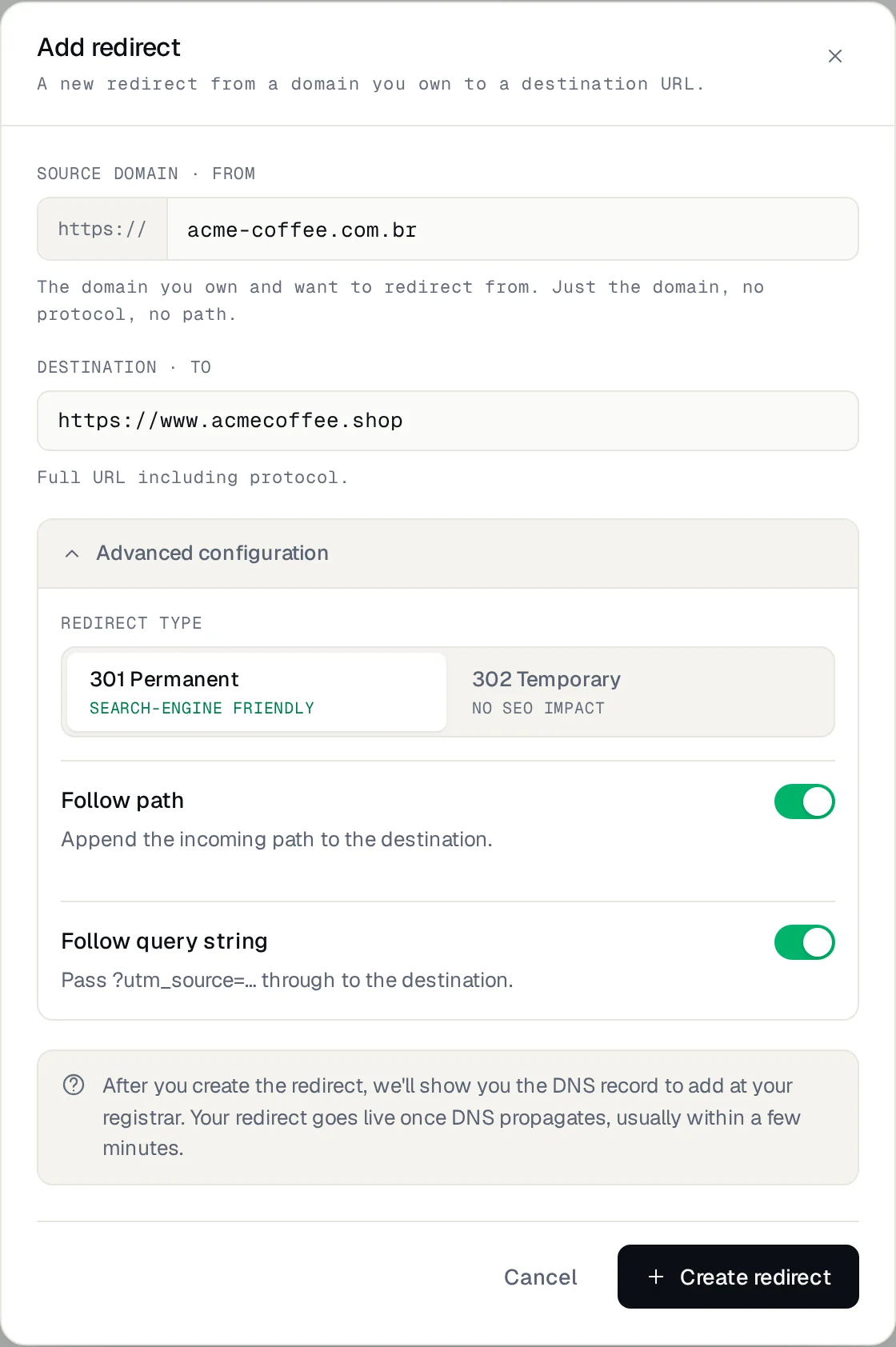
- Add a redirect for
old.comwith the destinationhttps://www.new.com. Keep the defaults: 301, Follow path and Follow query string on. - Add a second redirect for
www.old.com, with the same destination. Each domain name is its own redirect. - For every URL that changed, add a custom path on the old domain pointing to its new address. Custom paths are unlimited.
- At your DNS provider, point the old domain to us with the A record shown on the redirect's page, and remove any other A or AAAA records for the same name.
- Wait for Record verified. The HTTPS certificate is issued automatically, so links to
https://old.com/…keep working too.
Changing the A record only affects the website. Your email (MX records) stays exactly where it is, and once the redirect is live you no longer need hosting for the old domain.
The full walkthrough, with every screen, is in the configuration guide.
Tell Google about the move
- Add the new domain to Google Search Console and verify it. Keep the old property: you'll need it.
- Submit the new site's sitemap in the new property.
- In the old property, open Settings → Change of address and choose the new site. Search Console checks that your homepage and some pages return a 301.
- Update everything you control: social profiles, your Google Business Profile, email signatures, ads, and the internal links of the new site, which should point straight to the new domain.
Check, then keep an eye on it
Test a few URLs: the homepage, your top pages, a page whose path changed, and one with ?utm_source= at the end. Each should arrive at the right page in a single hop:
curl -I https://old.com/products/blue-mug

HTTP/1.1 301 Moved Permanently
Location: https://www.new.com/shop/blue-mug
In the following weeks, watch the Pages report of the new domain in Search Console (indexed pages should climb) and the Traffic of the redirect in your dashboard. Visits to the old domain drop slowly as Google updates its results. What remains comes from old links and bookmarks, which is exactly why the redirect should stay.
How long to keep the redirects
Google recommends at least a year. We recommend keeping them for as long as you own the old domain: links on other sites, printed material and bookmarks never update themselves, and each one is a visitor you'd otherwise lose.
Frequently asked questions
Will I lose traffic?
A short dip is normal while Google crawls the new addresses. With a 301 on every old URL to its equivalent, rankings usually come back within a few weeks.
Should I use a 301 or a 302?
A 301. A 302 tells Google the move is temporary, so it keeps the old URLs in its results. More in 301 vs 302: which one to use?.
Do I need to keep hosting the old site?
No. Once the old domain points to Redirect-301, it needs no server. Keep the domain registered, not the hosting.
Hundreds of my URLs changed. Do I add them one by one?
You can, in the dashboard. On the Studio and Enterprise plans you can also create them from a spreadsheet or a script with the REST API.
Need help?
Feel free to reach out to us with any questions. We're here to help! Scan the QR code or click the button below to join our WhatsApp group.
Open WhatsApp →