HTTPS and the domain without www: why the root needs a redirect
Browsers hide "https://" and "www", so people type just mysite.com. Here is why that address needs HTTPS and a redirect, and how to check yours.
The address people see (and type)
Look at your browser's address bar. Since 2019, Chrome hides https:// and www by default, and Safari shows only the domain. So even when your site lives at https://www.mysite.com, what visitors see is just mysite.com.
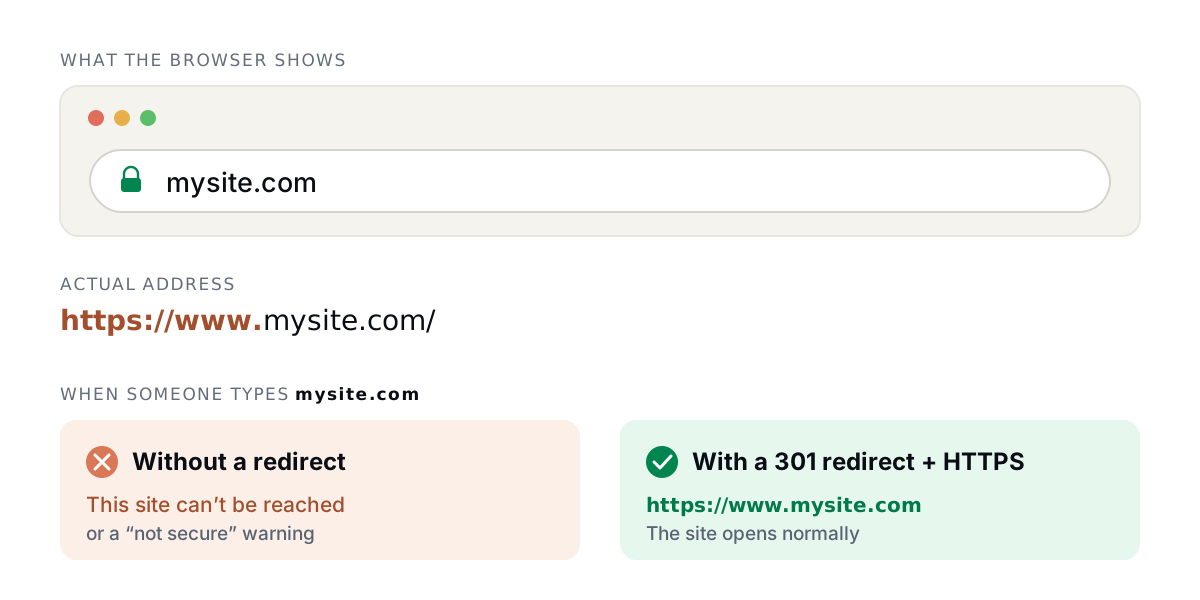
That is the address people remember, write on Instagram, print on business cards and say out loud. When they come back, they type mysite.com, without the www. If that address doesn't work, they reach an error, not your site.
Why HTTPS is no longer optional
The common problem: www works, the root doesn't
Many hosting services and site builders only work on www (a CNAME record), and the root domain can't point to them. The result is a site that works at www.mysite.com and fails at mysite.com, which is exactly the address people type.
| How the root domain is set up | What the visitor gets |
|---|---|
| No record for the root | "This site can't be reached" |
| Registrar forwarding, HTTP only | A certificate error or a "not secure" warning, because the browser tries https:// first |
| 301 redirect with an SSL certificate | Goes straight to https://www.mysite.com |
The forwarding offered by many registrars only works over HTTP. Since browsers try HTTPS first, it usually fails exactly where you need it.
The solution: a 301 redirect with HTTPS on the root
The root domain needs to answer over HTTPS, with its own valid certificate, and send the visitor to the main address with a 301 (permanent) redirect. That way:
- Whoever types
mysite.com, with or withouthttps://, ends up on your site. - Google treats
www.mysite.comas the main address and keeps all of its ranking. - Old links and printed material keep working.
With Redirect-301 you point the root domain to our IP, and we issue the certificate and redirect to www automatically. The step-by-step is in the configuration guide. If you're not sure between 301 and 302, see 301 vs 302 redirect: which one to use?.
How to check your domain
Open a private window (so the browser doesn't use its cache) and try the four combinations. All of them should end up on the same address, with the padlock:
| You type | Should end up at |
|---|---|
http://mysite.com | https://www.mysite.com |
https://mysite.com | https://www.mysite.com |
http://www.mysite.com | https://www.mysite.com |
https://www.mysite.com | https://www.mysite.com |
In a terminal, curl -I shows each step:
$ curl -I https://mysite.com
HTTP/2 301
location: https://www.mysite.com/
Frequently asked questions
If www works, isn't that enough?
No. Browsers hide the www, so many people type the domain without it. Without a redirect, all of them reach an error.
Can I make the domain without www my main address?
It depends on where your site is hosted. Many platforms only work on www. In that case the root domain has to redirect to www.
Does the domain without www need its own certificate?
Yes. The browser checks the certificate of the address you typed before following any redirect. Redirect-301 issues and renews it automatically.
Will the redirect hurt my SEO?
No. A 301 from the root to www is exactly what Google recommends to have a single main address.
Need help?
Feel free to reach out to us with any questions. We're here to help! Scan the QR code or click the button below to join our WhatsApp group.
Open WhatsApp →